
As the year wraps up, here are the latest resources to help you and your community stay sharp with your digital skills.
The Be Connected website, managed by the eSafety Commissioner, offers hundreds of resources – including self-paced courses, online presentations, articles, podcasts, and even a games and skills practice area – to help older Australians and those who support them to keep their online skills sharp and increase their confidence using the internet and digital devices. Best of all, they’re all free!
Discover Be Connected’s latest online safety advice and start learning new skills today.
New Resource: Which Icon Is That?
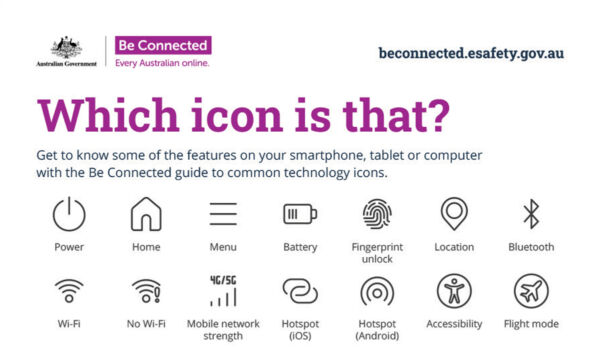
Have you ever wondered what a certain icon on your device means? The new icon glossary breaks down the most common icons found across your devices and explains exactly what they do.
Whether it’s connecting your device to Bluetooth, making video calls or cropping your photos, discover more features available on your device with confidence using the glossary.
Consider downloading the glossary and hanging it up in your community to help those around you identify what different icons mean: beconnected.esafety.gov.au/topic-library/articles-and-tips/icon-glossary
How to Spot an Email Scam
Fake or phishing emails range from the downright obvious to the alarming lookalikes. Their goal is to trick you into thinking the sender is an organisation you’re familiar with or someone you know, in order to get your personal information.
Be Connected’s new article on how to spot email scams shares tips to help you spot the red flags, ways to protect yourself and what to do if you think you’ve received a phishing email and quizzes to put your scam-spotting skills to the test.
Stay scam savvy: beconnected.esafety.gov.au/topic-library/articles-and-tips/how-to-spot-a-fake-email
Upcoming Free Online Presentations
Join a live online presentation to develop your digital skills and keep safe online. Be Connected’s free presentations cover a wide range of topics every month.
Catch one of the final sessions for the year:
- 7 November: iPhone basics
- 26 November: Protect yourself against scams
- 28 November: Safer online shopping – Festive season edition
- 3 December: Staying safe on Facebook
- 4 December: Connecting to others
- 5 December: Apps for smarter travel
Learn more and register your attendance: beconnected.esafety.gov.au/online-safety-presentations